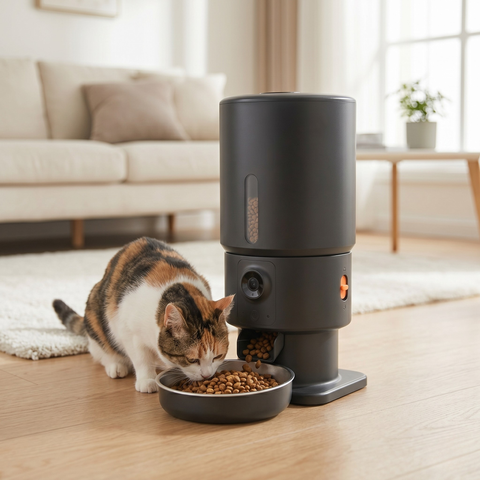
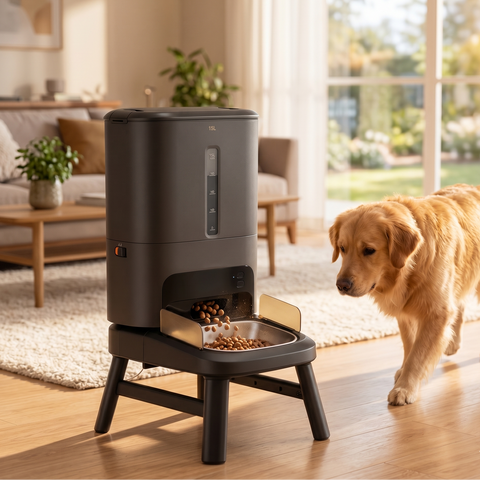
An automatic pet feeder takes a lot of worries off your hands: your pet receives the right portion at fixed times, even when you are not home. But how exactly does such a smart feeder work? In this guide, we explain how the ChromeFeeder with wifi and app functions, from filling to setting the portions.
📌 In brief
- The ChromeFeeder dispenses dry food in fixed portions at fixed times.
- Via wifi and the app, you can set everything up and remotely dispense extra portions.
- The 2L stainless steel food reservoir keeps kibble fresh and hygienic.
- You can record a voice message that plays with each meal.
- Ideal for busy days, portion control, and pets that eat too quickly or too much.
SmartPaw Editorial · Published on August 8, 2026 · Last updated on August 8, 2026 · Facts checked against product specifications and veterinary guidelines on portion control.
How does the ChromeFeeder dispense food?
The ChromeFeeder stores dry food in a reservoir and dispenses an exact number of portions into the stainless steel feeding bowl per programmed meal. You decide how many meals per day and how many portions per meal. This way, your dog or cat always receives the same amount, without you having to be present.
How do you set up the ChromeFeeder via the app?
You connect the feeder via wifi to the app on your smartphone and set the feeding schedule there. In the app, you create meals with a time and portion size, and you can remotely give an extra portion at any time. Handy if you come home later than planned.
| Step | What you do |
|---|---|
| 1 | Fill the reservoir with dry food and close the lid tightly. |
| 2 | Connect the feeder to your wifi network via the app. |
| 3 | Set meals: time + number of portions. |
| 4 | Optionally, record a voice message for each meal. |
| 5 | Test one portion and check if everything dispenses smoothly. |
💡 Tip: Use dry food with a uniform kibble size. Kibble that is too large or greasy can get stuck; round, dry kibble dispenses most smoothly through the dispenser.

ChromeFeeder automatic pet feeder 2L
Stainless steel feeder with wifi and app. Program meals, dispense portions remotely, and record a message for your pet.
View product →Does the food stay fresh in the ChromeFeeder?
Yes, the sealed reservoir keeps the kibble dry, and the stainless steel feeding bowl is hygienic and easy to clean. For extra freshness, you can place a moisture absorber in the reservoir. Clean the bowl regularly to prevent a greasy layer or odor from forming.
Which animals is the ChromeFeeder suitable for?
The ChromeFeeder works for both cats and dogs that eat dry food. It is especially useful for animals that need to eat at fixed times, who require portion control (e.g., for overweight animals), or when you have irregular hours. For wet food, an automatic feeder with cooling elements is needed — the ChromeFeeder is designed for dry food.
More practical explanations can be found in our guides setting up an automatic pet feeder step by step and cleaning an automatic pet feeder.
FAQ
Does the ChromeFeeder work without wifi?
The basic function (programmed meals) continues to work, but for remote setup and app functions, you need wifi.
Can I use wet food?
No, the ChromeFeeder is made for dry food. Wet food spoils quickly and is not suitable for a dry dispenser.
What if the power goes out?
Many models have battery backup so the schedule continues. Check the included manual for your version.
How many portions can I set per day?
You divide the daily amount over multiple meals, each with its own portion size, ideal for animals that benefit from eating small amounts spread throughout the day.
View all automatic pet feeders →
This blog is informative and does not replace veterinary advice.
Meer uit dit onderwerp

Waarom braakt mijn hond 's ochtends gele schuim?
Je hond braakt 's ochtends gele schuim? Lees wat galbraken is, wat een late avondmaaltijd kan doen en...

Voerbak hond: RVS, keramiek of plastic?
RVS, keramiek of plastic voerbak voor je hond? Eerlijke vergelijking met voor- en nadelen en een keuzehulp. Lees...

Hoeveel natvoer per dag mag een kat? Zo reken je het uit
Hoeveel natvoer per dag voor je kat? Rekenvoorbeeld, stappenplan en tips om natvoer en droogvoer te combineren. Zo...
Iets nodig voor je huisdier?
Onze fonteinen, voerbakken en de FurVac zijn gemaakt om je tijd te besparen en je huisdier gelukkiger te houden.
Naar de shop